Lamp Repair: Replace Touch Control with a Switch

My Mom’s bedroom lamp was malfunctioning so I told her to send it down with my Dad and I’d take a look at it.

The lamp uses a very common TA-306A touch control unit and the BT134 thyristor on the board often gets fried. I think this might have been my bedroom lamp when I lived with my parents 20 years ago, so there is no sense buying parts for it. I replaced the touch controls with a switch I salvaged from a different lamp.

HackerBox #0029 Field Kit Updates

I’ve customized the items in the HackerBox Field Kit and explained everything in this video.

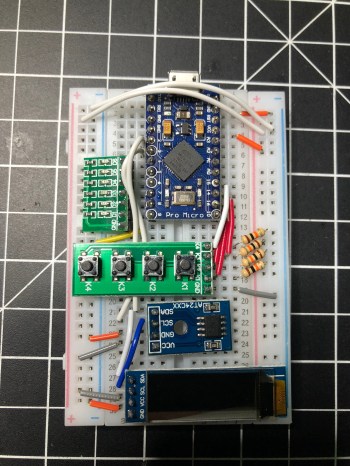
You can find the example code I put together for all of the modules in my hackerbox-29-field-kit GitHub repo.

hackerbox-0029-field-kit-modules-breadboard

I plan to keep the kit in my backpack, especially for trips up north when I visit family. Maybe I shouldn’t take this with me on flights though. Have you ever travelled with a bunch of wiring and electronics parts?

If you’re interested in an electronics community, join us on reddit and Discord.

HackerBox #0029: Field Kit

I did an unboxing and a little demo with the latest HackerBox.

Here is the official list of contents from the Instructable:

  • HackerBoxes #0029 Collectable Reference Card
  • Exclusive HackerBoxes Zipper Case
  • Portable 5V Soldering Iron
  • ProMicro ATmega32U4 5V 16MHz
  • OLED 0.91 Inch Display 128×32 I2C
  • Four Key Pushbutton Module
  • Six LED Debug Module
  • AT24C256 I2C EEPROM Module
  • 400 Point Solderless Breadboard
  • Jumper Wire Bundle
  • Set of Mini Grabber Clips
  • Solder Wick 2mm by 1.5m
  • MicroUSB Cable
  • MiniUSB Cable
  • Precision Driver Set
  • Exclusive Phone Phreak Decal Exclusive
  • Exclusive 8bit Dragon Keychain

I really like the idea behind this box. I’ve already rolled up more solder to keep in my kit and will have to think about what else to put in there. Maybe some potentiometers. It’s nice getting a microcontroller I don’t have yet.

I started a GitHub repo with some example code using all of the modules.

I had pretty much decided I was going to cancel my subscription so #0030 would be my last box. I think I mentioned recently about cancelling my AdaBox subscription, that I have accumulated a pretty decent collection of microcontrollers and other components. I spend a lot of time catching up on all of these boxes when I could be using that time to build projects from my own list of ideas, which is quite large. After getting #0029 though I think I’ll stick it out for longer and see how it goes.

Update: I made some customizations to my kit.

Come join the active community on Reddit and Discord. More info at HardWareFlare.

Boldport: Pips (#23)

When I was thinking about cancelling my AdaBox subscription I came across Boldport Club.

As a member of the Boldport Club you’ll receive an electronics project once a month. Our projects are designed to be engaging, challenging, entertaining, collectable, and to promote exploration and discovery through the use of electronics.

Weird timing that AdaBox007 actually included the Cad Sticker set from Boldport Club.

Over the last year or I’ve come to realize I really enjoy little soldering kits. Time will tell if the Boldport Club is satisfying and worth the cost. Each project looks unique and really well designed. I paid for a year up front, which comes out to pretty much the same as a year of AdaBox and I get something every month instead of quarterly.

Here’s a time-lapse of my assembly of Boldport Club #23: Pips.

It was a fun assembly and works as advertised. Not sure I’ll get any future use out of it though.

AdaBox007: Spy

When Adafruit hinted that AdaBox #007 would have a spy theme I was excited. I did a time-lapse of the unboxing this time since they do their own unboxing (scheduled some time next week) which is much better than listening to me talk.

This box has more content than any other box so far.

  • Large Padlock & 9 Piece Lockpick Kit
  • Software Defined Radio USB Receiver with Antenna
  • Adafruit GEMMA M0
  • USB Cable – 6″ A/MicroB
  • AAA Battery Holder with On/Off Switch
  • 3 AAA Batteries
  • Fast Vibration Sensor Switch
  • Piezo Buzzer
  • Panel Mount 10K Potentiometer + Knob
  • Invisible Ink Pen
  • 5mm Purple UVA LED
  • IR (Infrared) Receiver Sensor
  • 5mm Super-bright IR LED
  • 0.1mm Magnet Wire
  • Digikey Digi-Keyer Puzzle
  • Digikey Web Cam Cover
  • EFF Multisticker Sheet
  • 2600 Magazine: The Hacker Quarterly
  • Hackspace Magazine
  • Boldport Club Cad Sticker

I’ve always wanted a lock pick set and the clear padlock seems like a cool way to learn. I’ll have to make some videos once I start learning how to pick locks.

Even with this box being one of the better ones, I think I’m going to cancel because I have built up quite a collection of Adafruit microcontrollers and other components. I need to start building projects that I actually use around the house instead of just tinkering and taking everything apart after I learn. I like the subscription, but they’ve left me wanting more because it really is focused on the beginner. Not saying I’m an expert by any stretch of the imagination but I have so many of the things included in most of the boxes now.

I can’t help myself and have already subscribed to a different monthly electronics kit. More on that in a few days.

HackerBox #0028: JamBox

I like it when the new HackerBox shows up on a weekend.

I always see electronics projects for making some kind of digital synthesizer to generate sounds so it seems to be a common project. It’s one I’ve never done, so I’m looking forward to experimenting with this box.

The official content list from the Instructable:

  • HackerBoxes #0028 Collectable Reference Card
  • Exclusive JamBox Printed Circuit Board
  • ESP32 DevKitC
  • CJMCU PCM5102 I2S Digital-to-Analog Module
  • Four MAX7219 8×8 LED Matrix Modules
  • Five 10K Ohm RV09 Potentiometers
  • Five Potentiometer Knobs
  • Eight Tactile Momentary Buttons
  • Four Adhesive Rubber Feet
  • 3.5mm Audio Patch Cable
  • MicroUSB Cable
  • Earbuds with Case
  • Exclusive HackerBoxes Skull Decal
  • Octocat Fan Art Decal Sheet

Unfortunately the demo code included in the guide only uses the potentiometers, buttons, and LEDs. Will need to do some tinkering to turn this into a synth.

Unboxing & Assembly of HackerBox #0027: Cypherpunk

Here’s the full list of the box contents from the Instructable.

  • HackerBoxes #0027 Collectable Reference Card
  • Black Pill STM32F103C8T6 Module
  • STLink V2 USB Programmer
  • Full-Color 2.4 inch TFT Display – 240×320 Pixels
  • 4×4 Matrix Keypad
  • 830 Point Solderless Breadboard
  • 140 Piece Wire Jumper Kit
  • 2 U2F Zero Soldering Challenge Kits
  • Large 9×15 cm Green Prototying PCB
  • Exclusive Vinyl GawkStop Spy Blockers
  • Exclusive Aluminum Magnetic Swivel Webcam Cover
  • Exclusive EFF Patch
  • Privacy Badger Decal
  • Tor Decal

I haven’t done an assembly video on a HackerBox in months. I have received some comments that they are really helpful for beginners, so I’m going to try to do one each month, which will also push me to complete the kits sooner. With all of the surface mount components this is a really good box to start with.

Catching up on Electronics Projects

I’m behind on a bunch of electronics subscription boxes and projects, so I’m just going to list out a bunch of stuff. None of its worthy of its own post anyway.

One of the projects for HackerBox #0023 was to build a custom antenna out of PVC, copper wire, and glue. I did a pretty piss poor job of drilling my holes in a straight line (as you can see in the picture), but I connected it to a microcontroller and was able to scan for Wi-Fi networks in the area. Success?

img_0591.jpg

I need to make more time to work with the pan and tilt system built with HackerBox #0024.

The camera that came with the project can only do 640×480, which sucks. One of these days I’ll connect the system to a Raspberry Pi and use one of my unused Pi cameras instead. Would be neat to mount at the front door to track anyone who comes to the house when I’m not home. The face tracking stuff is pretty awesome, even with the shitty camera. Here’s a really rough video of it.

I had to modify the code a lot to get everything working and I put it all on GitHub. If I work on this project more I’ll update that repo.

There wasn’t a lot to do with HackerBox #0025. It was mostly a soldering and look at the blinky lights project. Here are the 3 badges I made. I turned the star and rectangle (with a “Let’s Party” sticker in place) into pins and gave them to my nieces.

The skull badge has a buzzer on it, so I wrote some code (it’s on GitHub) to make it play the Star Wars theme and display some light animations.

Over the holidays I messed with AdaBox006 a bit. The 38 I posted on my birthday was a light painting taken with the Slow Shutter iOS app. I got it the light paintbrush working on both the Circuit Playground classic via a customized Arduino sketch and on the Circuit Playground Express through MakeCode. Both are available in the adabox-006 repo on GitHub. Using MakeCode is a fun way to program and I think it’s going to change the way people learn. Look at how simple and visual that version of the program is…

adabox-006-make-code-light-paintbrush.png

I did solder everything for HackerBox #0026 and verified some of the functionality, but haven’t done much with it. It was one of the most fun projects so far from HackerBoxes because of how many components were on this PCB. I find soldering to be so relaxing and satisfying.

I added the code for the temperature sensor I mentioned and showed in my post Why Are Thermostats Still on the Wall? to a new dht11-low-pass-filter repo on GitHub. Very simple, but useful.