The Gift of Programming

hackers

The first program I remember “writing” was on a TRS-80 connected to a TV for the display and a cassette tape recorder for the disk drive. The language used was BASIC. I did nothing more than copy the code out of a book. It made bars of different color appear on the screen. Fancy stuff! I was probably 8-10 years old if I had to guess.

I don’t remember touching a computer much after that until we had WordPerfect, the Oregon Trail, and Where in the World is Carmen Sandiego in one of my middle school classes. I did try writing a few choose your adventure type things on a TI-86 calculator in high school, though I mostly used it to store formulas and notes for cheating on tests.

I didn’t really get into writing code until I switched my major from Accounting to Computer Science in the first month of college. I wish I’d been more interested in those earlier years.

Everybody in this country should learn how to program a computer… because it teaches you how to think.

Steve Jobs

While browsing at Toys”R”Us to buy gifts for my nieces, I prefer to find something in the learning or creative sections because they get plenty of toys from everyone else. My mom had picked up a book of mazes for me to get Kennedy (6), because she’d been really into them lately. When I saw the Code & Go™ Robot Mouse Activity Set I was excited and didn’t hesitate to put it in my shopping cart.

Today I sat down with Kennedy and showed her how it worked. It took her a few mazes to get the hang of separating steps, but before long she had the hang of it and was even able to do her own form of debugging when there was a mistake. Here she is programming and testing card 9 after planning it out. I think this was the first one she did on her first attempt.

Like any good programmer, by card #16 she wanted to do away the planning stage and directly input her program. It worked out, but the 17th maze was long and complex. After having to start from scratch three times, she realized the planning stage was useful.We played for over 3 straight hours! After finishing all 20 cards, it was time to design her own mazes.

maze-21.jpg

Yesterday I had introduced her to ScratchJr on the iPad.

With ScratchJr, young children (ages 5-7) can program their own interactive stories and games. In the process, they learn to solve problems, design projects, and express themselves creatively on the computer.

I showed her around the app and she seemed to be having fun. I’m curious to see if she’ll use the app on her own and start building stories.

I think it’s a shame programming isn’t a core class in schools yet. It opens so many doors and will only be getting more important. Writing code and making a computer do what you want makes math fun and really does teach you how to think because you have to break things down and learn about logic.

Unfortunately many adults think it’s too late to learn to write code. It’s not.

The first thing many of us write in a computer language is called a Hello World program because the goal is simply to make the words “Hello World” display on the screen. Browse through Hello World Programs in 300 Programming Languages to see how simple many of them are.

If you’d like to get started Hour of Code has a lot of tutorials. Or grab a Raspberry Pi, which makes a great little dev machine. Issue 53 of The MagPi Magazine (free PDF download) has an easy to follow beginner’s guide to coding.
Pi Tips

I stuffed myself on Raspberry Pi this weekend, making great progress on my Pi 3 project, getting to a usable basic v1. I’ll share more details on this after Thanksgiving. I also decided to rebuild my Pi Zero Homebridge server by installing Raspbian Jessie Lite (previously installed Raspbian via NOOBS) since it’s a headless system. It’s always fun to mess around with linux, though I couldn’t handle it as a full-time operating system.

While it’s fresh in my mind, here are some things that either tripped me up in the past or I found over the weekend.

  1. If you hide your Wi-Fi network, after you install Raspbian you’ll be scratching your head wondering how to connect. There is no UI for it and you might not even be setting up your Pi to launch into a GUI. Might as well dig into the command line right away by editing a couple of files.
  2. Monitor configurations are a pain in the ass. For the longest time I thought the 7″ display was a piece of shit because it was so blurry. Can’t this stuff be plug-n-play? Then then 3″ display I bought for the Pi 3 seems upside down considering where most of the ports are located. I found a little package of scripts called LCD-show linked off a LCD info page. I’m not even sure if my LCDs are close to the ones sold by this company, but these scripts work great. You can easily reboot in different screen orientations too (the rotation didn’t seem to work properly with the mouse on my 7″, but I didn’t try to troubleshoot at the time).
  3. Use Unclutter to hide your mouse cursor when you don’t need it.
  4. Clone and restore SD cards from the command line, because you’re in the linux spirit already.
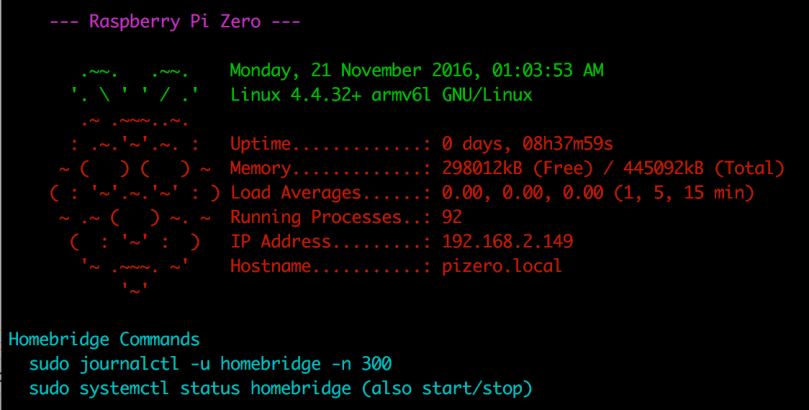
  5. Since I only access the Pi Zero via SSH, being welcomed by a bit of color with some info about the machine and reminders helps to increase the sugar content. I made a few modifications (my version is below) to a custom MOTD. The colors are set by $(tput setaf 5) and changing the number (color table). You probably want to add this to .bashrc though and not .bash_profile as instructed.

raspberry-pi-custom-motd

    let upSeconds="$(/usr/bin/cut -d. -f1 /proc/uptime)"
    let secs=$((${upSeconds}%60))
    let mins=$((${upSeconds}/60%60))
    let hours=$((${upSeconds}/3600%24))
    let days=$((${upSeconds}/86400))
    UPTIME=`printf "%d days, %02dh%02dm%02ds" "$days" "$hours" "$mins" "$secs"`

    # get the load averages
    read one five fifteen rest < /proc/loadavg

    echo "$(tput setaf 5)
    --- Raspberry Pi Zero ---
$(tput setaf 2)
       .~~.   .~~.    `date +"%A, %e %B %Y, %r"`
      '. \ ' ' / .'   `uname -srmo`$(tput setaf 1)
       .~ .~~~..~.
      : .~.'~'.~. :   Uptime.............: ${UPTIME}
     ~ (   ) (   ) ~  Memory.............: `cat /proc/meminfo | grep MemFree | awk {'print $2'}`kB (Free) / `cat /proc/meminfo | grep MemTotal | awk {'print $2'}`kB (Total)
    ( : '~'.~.'~' : ) Load Averages......: ${one}, ${five}, ${fifteen} (1, 5, 15 min)
     ~ .~ (   ) ~. ~  Running Processes..: `ps ax | wc -l | tr -d " "`
      (  : '~' :  )   IP Address.........: `/sbin/ifconfig wlan0 | /bin/grep "inet addr" | /usr/bin/cut -d ":" -f 2 | /usr/bin/cut -d " " -f 1`
       '~ .~~~. ~'    Hostname...........: `hostname --long`.local
           '~'
$(tput setaf 6)
Homebridge Commands
  sudo journalctl -u homebridge -n 300
  sudo systemctl status homebridge (also start/stop)
    $(tput sgr0)"

What are your favorite Raspberry Pi tips?

WordPress Plugin: Comment Author URL Stripper

As promised, I’ve created a plugin which removes the URL from a comment author if it contains any of the words specified in the Options screen. Too many people have been leaving comments and putting in yahoo, gmail, hotmail, etc. as their web site and I got tired of editing those comments all of the time. Now I simply put a few words into the Options screen and the plugin automatically does the work for me.

Comment Author URL Stripper

Could I have chosen a longer name for the plugin?

I had thought about including an option to prevent any previous comments with the specified words from displaying their URL, but decided against it. I used the following in phpMyAdmin to quickly do the work…

UPDATE `wp_comments` SET `comment_author_url`='' WHERE `comment_author_url` like '%PUTWORDHERE%'

* If you’re using a different table prefix, make sure to change wp_comments to reflect it.

* Replace PUTWORDHERE with hotmail as an example.

Google Adsense Flickering Fix

I don’t know how long I’ve been bothered by the Firefox problem with Google Adsense ad blocks. I’m sure you know what I’m referring to. While a web page is loading all you can see are Google ads flickering across the page. Or you’re on a site and when you move the mouse over a link, the Google ads flicker. It’s rather annoying. The funny thing is IE, our favorite browser, doesn’t have this problem. Or is it that FF behaves correctly (which is not desired) and IE’s behavior (preferred) is wrong?

Read More »

WordPress Plugin Update Notification

Last night I went out searching for plugin updates. I use quite a few plugins at all of my sites, so I wanted to get everything updated. After visiting countless sites, I became frustrated. Most people post about their plugins on their own blogs, but finding some updates is like looking for a needle in a haystack.

Today the light bulb went off. WordPress needs a way for plugin users to be notified when there are new versions of plugins. I’ve come up with a couple of ideas.

  • What if there was a central site (maybe there are already plans for the WordPress Plugin Repository) for all of the plugins. Everyone (both plugin users and developers) would have an account on the site. You can download plugins, look at the code, submit bugs, and many other things. Some of these are already available at the Repository. But one thing that the current site doesn’t have is the ability for a user to mark which plugins they use. If users could pick which plugins they use, then the site could mail these users each time a plugin is updated. We’d never have to live with old code again.
  • The second idea may be able to work with the first somehow. If a central site is recognized and used for plugins, a plugin could be created to go through the list of plugins in a WP install. It could then contact the plugin site and compare version numbers. If there is a new version, either email the admin of the WP install, or put a notification in the Dashboard.

These are just a few quick ideas I had today. Not much thought went into it, but I’d be interested in hearing what others have to say. Who knows, maybe Matt already has something up his sleeve.