I found these old Coca-Cola pocket mirrors in an organizer drawer I bought at an estate sale. You never know what you’re going to end up with at these sales! They made a neat extra gift for my nieces.

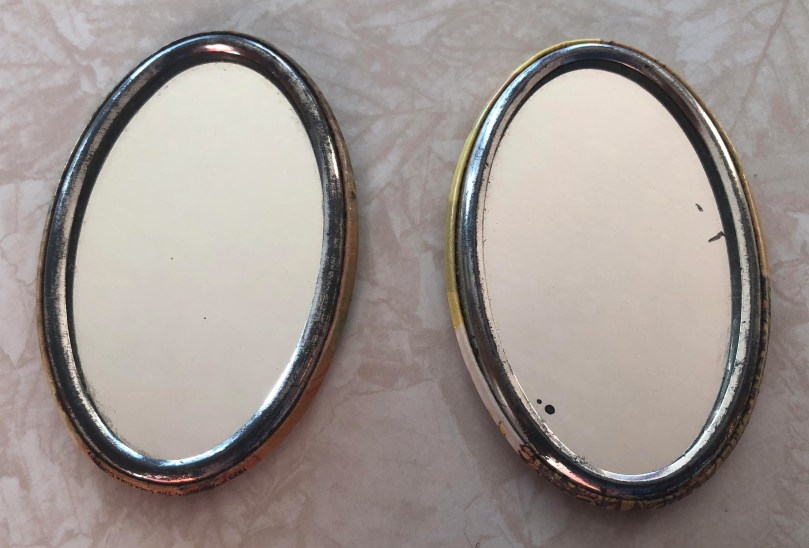
I found these old Coca-Cola pocket mirrors in an organizer drawer I bought at an estate sale. You never know what you’re going to end up with at these sales! They made a neat extra gift for my nieces.

Mom gets what Mom wants. The necessary parts came in to build Mom’s Raspberry Pi-Hole server, so I thought I’d take the extra time to keep track of every step, trying to make it as easy and low-cost as I could. This meant not attaching a monitor or keyboard through the entire process. Hopefully someone will benefit from this guide. It looks long and scary, but I tried to be as thorough as possible. Nothing here is particularly difficult if you can follow directions.
Note: these instructions are for using a Mac.
At a minimum, I recommend:
Make sure the microSD card is class 10, because it’s faster and don’t be afraid to go for 16GB since they are so cheap. Adafruit sells a budget pack which includes everything above except the WiFi adapter. If you don’t want to use WiFi, you could get something like this Ethernet Hub and USB Hub.
I also recommend some type of case. It may be small, but it’s still a computer with electrical components. 😉 I bought the Adafruit Raspberry Pi Zero Case this time around, but I don’t like how loose the GPIO slot cover is. Three cases I use with my own Zeros and like (ordered by preference) much better are:
Shouldn’t cost more than $50.

.txt without MacOS adding it back on. This file needs to be named exactly wpa_supplicant.conf.
YOUR_SSIDYOUR_PASSWORD with your WiFi password. Save the file.wpa_supplicant.conf file to the SD card.cd /Volumes/boot and hit Enter.touch ssh and hit Enter.


If you did the second half of step 2 correct, the Pi should have been able to connect to your WiFi network. Give it 1-2 minutes to go through the entire boot process.
ssh pi@raspberrypi.local and hit Enter.
ssh pi@192.168.1.123 but you’ll need to find it in the DHCP list in your router’s admin.yes and hit Enter.raspberry (you won’t see any characters on the screen) and hit Enter. This should log you in and set you at the command prompt…
sudo apt-get update and hit Enter.sudo apt-get upgrade and hit Enter. When it asks Do you want to continue? [Y/n], type y, hit Enter, and wait.sudo raspi-config and hit Enter.nickspi the new command I would type is ssh pi@nickspi.local. You’ll be prompted again to continue and enter the password. Do both.curl -sSL https://install.pi-hole.net | bash and hit Enter.pihole -a -p PASSWORD_YOU_WANT_TO_USEEnjoy your mostly ad-free browsing and faster network!
It’s not advised to unplug the Pi from power when it’s running. You could corrupt the SD card. SSH in (you’re a pro by now) and issue the shutdown command:
sudo shutdown -h now
Wait about a minute before unplugging power (make sure the activity light has been off at least a few seconds). You can also issue a restart command if you need to:
sudo reboot
Periodically it’s a good idea to update the software:
sudo apt-get update

sudo apt-get upgrade

pihole -up
With all of that said… if you plan to run anything else on this server, I recommend going with more power, probably a Raspberry Pi 3 Model B. The Zero I originally used wasn’t enough to handle Home Assistant and Homebridge running on the same machine.
Mom loved browsing without ads so much during a recent visit she asked me to make a Pi-Hole server for their network. I still can’t believe how much faster browsing is. Great time to grab a Raspberry Pi Zero during Adafruit’s sale.
It looks like Google has done some updating with AdSense because I’m getting updated stats every few minutes. It used to take 30 minutes to an hour for stats to update and even then they seemed to be behind. Just what I need. It’s not like I don’t suffer from Repetitive Information Injury (RII) enough. […]
I’ve been testing out the Chitika ad program for a couple of weeks. So far it hasn’t brought in much income, but it shows potential. If you have a site with a lot of products or that has technical content it might work well for you. By clicking my link in this post I’ll get […]
I’m digging the new Google Adsense interface. Reports and channel data are easier than ever to access.
Targetpoint looks like another Google AdSense clone.
Google Adsense adds an EFT payment option. I’ll be happy to get my payments deposited right into my bank account instead of waiting 4 weeks for my monthly check to be sent.
Does anyone else love the new Coke commercial? It’s the one with the “…put the lime in the Coke, ya nut…” jingle. I can’t stop singing it!
Google adds Ad Links to AdSense. View samples.
 Nick Momrik