The first album I ever remember having was Brothers in Arms by Dire Straits on cassette tape. I have no idea when I got it, but it was released May 1, 1985.
Do you remember your first album?
The first album I ever remember having was Brothers in Arms by Dire Straits on cassette tape. I have no idea when I got it, but it was released May 1, 1985.
Do you remember your first album?
After the recent changes to my home network and Home Assistant server, I noticed the logs in Pi-Hole were being dominated by the domain I use for dynamic DNS on the box. Roughly 15,000 DNS requests a day out of 30,000 on my entire network. Really skews the ad blocking stats.
Why so many DNS requests? Because home-assistant-pi and home-assistant-temperature-monitor were both using the Home Assistant REST API to fetch data. That’s 15k requests/day with only two of my seven other Raspberry Pis turned on, so it would get worse when I put some of the other Pis into “production” around the house. The temperature project only runs on one box, but the first project in installed on every Pi.
I briefly tried to switch those two projects over to using the local IP address of the server and continue to use the REST API, but with SSL enabled it was complicated. MQTT was already running on the server and those projects publish updates to Home Assistant over MQTT, so it was an easy decision to use it for subscribing as well.
While I was at it, I took the opportunity to simplify a lot of the code and have the devices update more frequently. So far it seems to have solved a couple of lingering stability or connection issues I was having with home-assistant-pi. All of the code changes are available in the respective GitHub repos linked earlier.
Update: I forgot I had home-assistant-pi connecting to google.com in to help with determining the local IP address in Python. Another update to clear that up will eliminate over five thousand DNS requests per day.
I like it when the new HackerBox shows up on a weekend.
I always see electronics projects for making some kind of digital synthesizer to generate sounds so it seems to be a common project. It’s one I’ve never done, so I’m looking forward to experimenting with this box.
The official content list from the Instructable:
Unfortunately the demo code included in the guide only uses the potentiometers, buttons, and LEDs. Will need to do some tinkering to turn this into a synth.


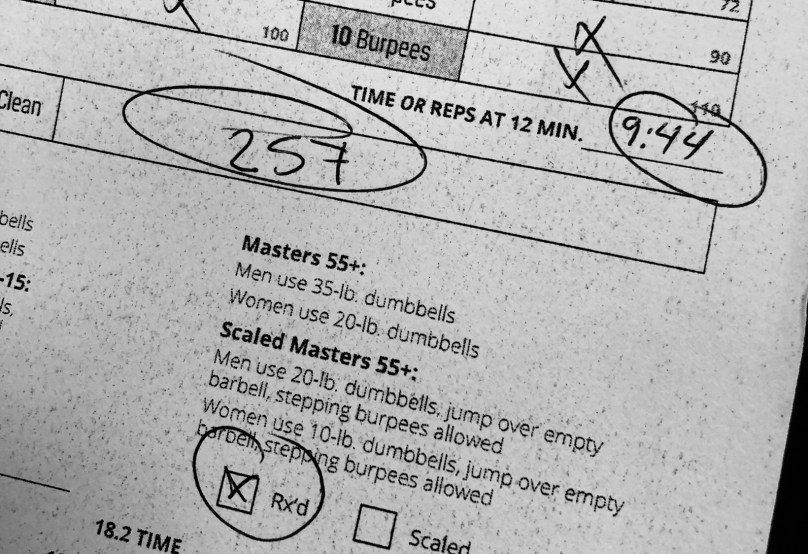
Disappointed with the time, but if I’ve learned anything during the Opens it’s that I’m terrible when there are box or barbell facing burpees in the workout.
I bought a small set of digital calipers so instead of cutting a 3rd slot in the old block (each set slid in from the front) I made a new one with holes so each set goes in from the top and can’t fall out.

Hay? Nope. Snow mold destroying my front yard.

It’s February 27th and I just got done with a workout in my garage. The unusual thing is I was able to do some farmers carry work outside and some running because it’s so nice out! I’d love if this weather was here to stay, but this in Michigan, so I know better.


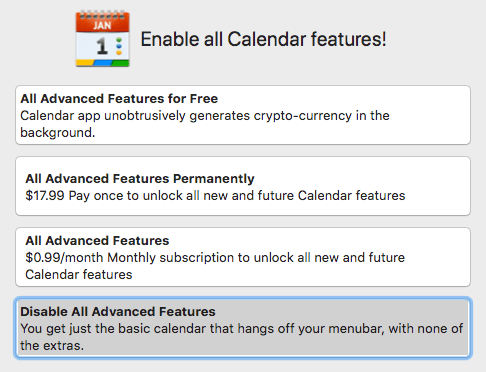
After updating apps today I got this pop-up. Check out the first option. Guess I’m uninstalling the Calendar 2 app!