A Record Streak

screen-shot-2017-01-26-at-9-17-37-pm This post makes 79 days in a row, breaking my old streak, which was set on April 13th, 2009. When I took notice of the posting streak and decided to keep going, I was worried I’d run out of things to publish within a couple of weeks. I haven’t had any issues though. These things have really helped:

  1. I quickly made the decision not to get caught up in the length of posts. Sharing a video or a simple link would be just fine some days.
  2. Whenever an idea strikes, I try to get an early title and some quick notes saved as a draft post in WordPress. I usually have at least 5 drafts in progress and had 10 at one point. Some of the drafts are waiting for a specific date or event while others just need to be completed.
  3. In Apple’s Reminders app, I have a repeating daily reminder. I don’t mark it as completed until I have published or scheduled the post for the day.
    post-to-blog-reminder.png
    The notification on my iPhone as well as my computers doesn’t let me forget.
  4. Speaking of scheduled posts, I usually have at least 1-2 posts set for the upcoming days. I tend to move them around when I want to publish something right away, but it helps to keep the process stress free.

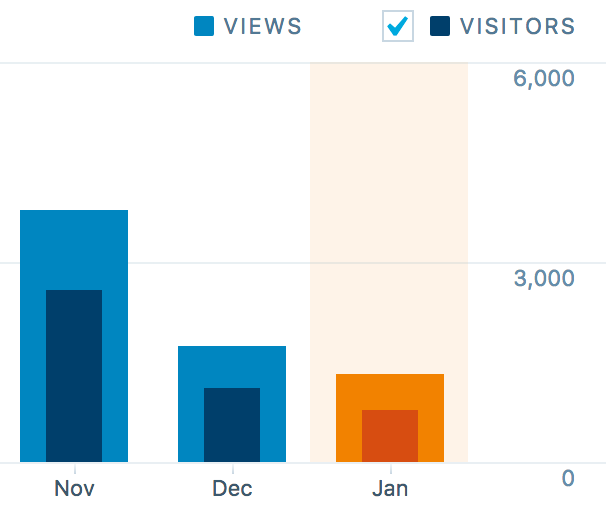
I don’t follow my blog stats closely, but I’m curious if the increased activity has caused the decline in visits and visitors. I would expect the numbers to move in the other direction.

stats-during-posting-streak.png

Home Assistant Pi

With all of the Raspberry Pis I have (now up to 6 after adding “flapper”), I wanted to get a bunch of data in Home Assistant (yes, I’m still working on a larger home automation post) and have an easy way to reboot or shutdown each computer.

I wrote a little app which runs as a service on each Pi. Here’s an example of what shows up in Home Assistant.

home-assistant-pi-groups.png

The Python app and sample Home Assistant configurations are in my home-assistant-pi project on GitHub. Of course it’s all Open Source.

Garage Monitor Updates

I made some updates to the Garage Temperature Sensor & Monitor. I didn’t like how the desired temperature was set via the app’s configuration file, so I moved it to a slider control in Home Assistant and updated the LCD to always show the value. Only being able to enable/disable monitoring via the device’s button also wasn’t great. I converted the binary sensor I was using to flag monitor mode in HA to a switch control and moved the actual monitoring logic from the Python app to HA automation. Everyhing is updated on GitHub.

updated-garage-monitor-ha.png
Info and controls in Home Assistant
img_8761
Custom temperature and humidity monitor