It’s around this time during the winter when I’m getting stir crazy. I’d rather be outside golfing. After the excitement of watching Tiger Woods last weekend the itch to play intensified.

It’s around this time during the winter when I’m getting stir crazy. I’d rather be outside golfing. After the excitement of watching Tiger Woods last weekend the itch to play intensified.
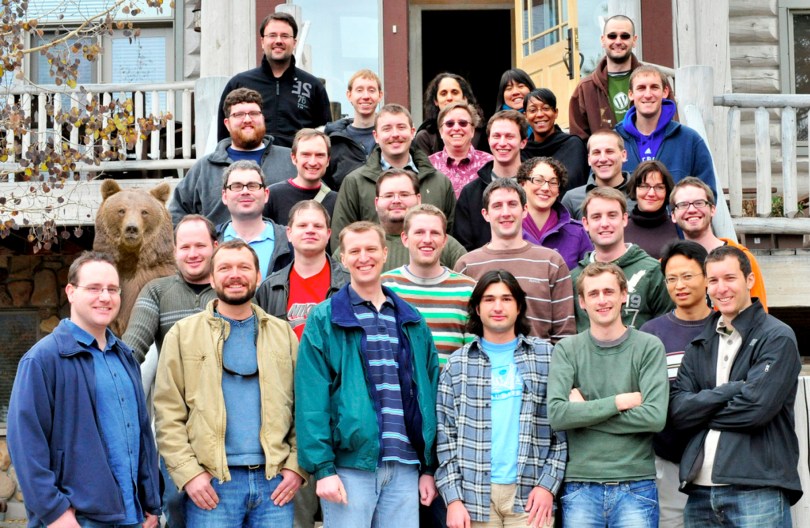
Ten years ago I left SVSU and started working for Automattic. I still remember discussing the risks of joining a startup with my parents. I think I made the right choice. 😉
March 13, 2008
March 13, 2018
Here’s a photo from the 2008 Grand Meetup, in Breckenridge, Colorado. Exactly half of the people in this photo no longer work with us.

Here’s the photo from the 2017 Grand Meetup in Whistler, British Columbia, Canada.

A lot has changed and I’m excited to see what happens in the next decade.
I never liked the box I used as a case for my dust separator electronics. I once saw a project where someone used an empty deodorant container as a case and figured it would work here.
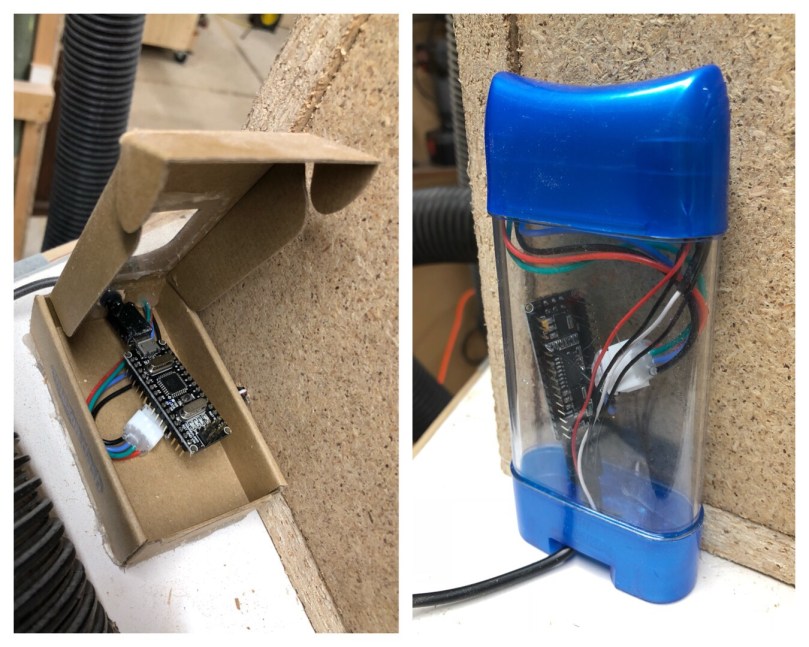
The container is easy to open up and being clear it’s a nice way to see the components.
So many people said we’d never see this again, but here we are. Tiger Woods wearing red with a chance to win on a Sunday. It’s an exciting weekend for golf!

Part 1 covered the devices I’m using for home automation. It’s been over a year and there have been some changes. I added a Leviton switch and got rid of the Wink hub.
This post will be about the software that brings things together, making it easy for me to manage and allows the devices to “talk” to each other. Maybe it’s a good thing it’s taken me almost a year to write this part 2 because there have been some dramatic improvements to how everything runs. I was using homebridge for a period of time, but found I never really used HomeKit/Siri. Home Assistant has been updating a new HomeKit component, so I’ll have to give it a try.
I’ve talked about Home Assistant in a lot of posts; it’s the software running on the Raspberry Pi 3 Model B to handle everything. It’s very powerful software and has been a lot of fun for me to configure everything. Being on a Linux box and having to configure everything through YAML files makes it a tough entry for the average homeowner though. It’s improved a lot in the year I’ve been using it with better documentation and some UI configuration tools, so it’ll be interesting to watch for the next 12 months.
Being Open Source was a big draw of HA for me. Open Sourcecraft has a good article about the creator. The project operates on an aggressive schedule you don’t see much; every 2 weeks a new version oh Home Assistant is released. These aren’t small updates either. Each update fixes a ton of bugs and adds support for new devices.
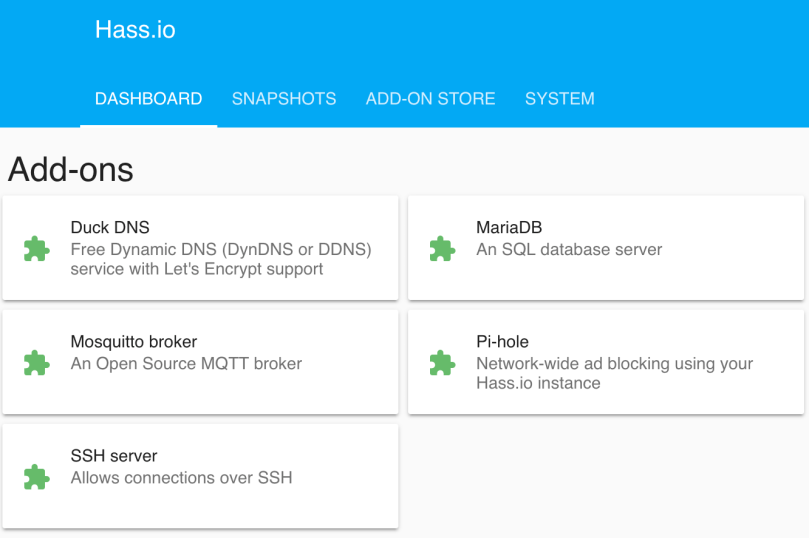
I did install HA using Hass.io, which simplifies the process and makes it easy to do upgrades and install add-ons. Here are the add-ons I’m using.
In addition to running Home Assistant, I wrote a couple of small services I run on Pis. The first is the temperature sensor/monitor I use in my garage. I’ve improved it a lot in the last year. The second service is home-assistant-pi, which reports a bunch of data about each Raspberry Pi on my network back to Home Assistant, which you’ll see in the screenshot below.
The beauty of Home Assistant is you can set everything up the way you want. Your limitation is your imagination and your comfort level with configuration files and code. I took a bunch of screenshots of my setup.

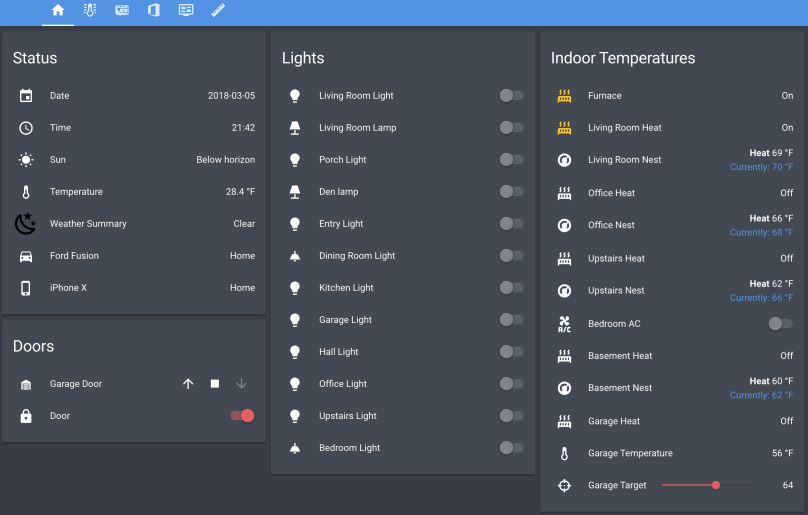


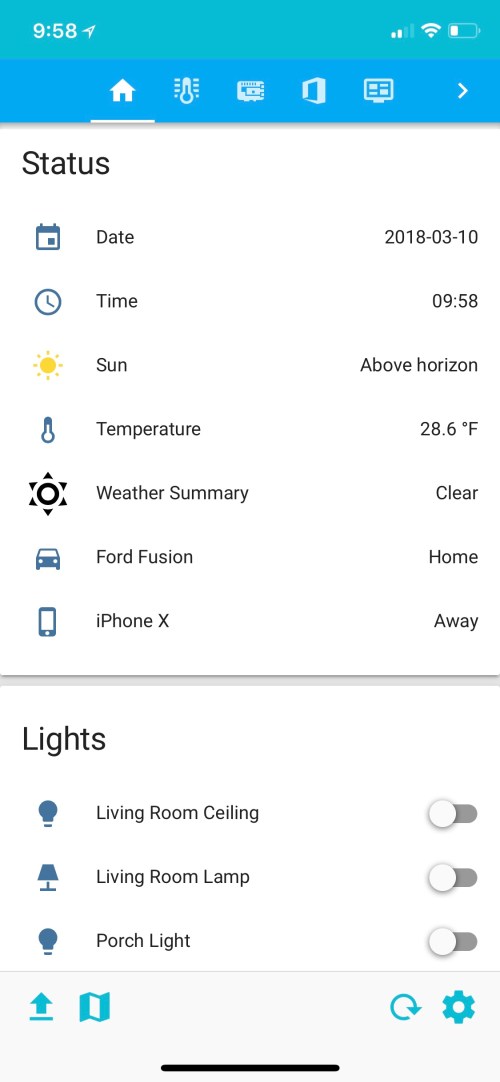
I keep all of my configuration (except the secrets file) in a GitHub repo in case I mess something up. I’ve learned a lot by looking at other examples, so my repo is public as well. Maybe my config will help out someone else. The repo is home-assistant-config. If you have any questions about anything you see in this post or in my configuration, let me know.
In the final post of this series, I’ll explain the cool part of this whole thing, the actual automations. I need to go through my ideas list and implement all of them though.

I still have every Halo game I’ve ever bought. I haven’t played in years, so it’s time to let go.

The first album I ever remember having was Brothers in Arms by Dire Straits on cassette tape. I have no idea when I got it, but it was released May 1, 1985.
Do you remember your first album?
After the recent changes to my home network and Home Assistant server, I noticed the logs in Pi-Hole were being dominated by the domain I use for dynamic DNS on the box. Roughly 15,000 DNS requests a day out of 30,000 on my entire network. Really skews the ad blocking stats.
Why so many DNS requests? Because home-assistant-pi and home-assistant-temperature-monitor were both using the Home Assistant REST API to fetch data. That’s 15k requests/day with only two of my seven other Raspberry Pis turned on, so it would get worse when I put some of the other Pis into “production” around the house. The temperature project only runs on one box, but the first project in installed on every Pi.
I briefly tried to switch those two projects over to using the local IP address of the server and continue to use the REST API, but with SSL enabled it was complicated. MQTT was already running on the server and those projects publish updates to Home Assistant over MQTT, so it was an easy decision to use it for subscribing as well.
While I was at it, I took the opportunity to simplify a lot of the code and have the devices update more frequently. So far it seems to have solved a couple of lingering stability or connection issues I was having with home-assistant-pi. All of the code changes are available in the respective GitHub repos linked earlier.
Update: I forgot I had home-assistant-pi connecting to google.com in to help with determining the local IP address in Python. Another update to clear that up will eliminate over five thousand DNS requests per day.
 Nick Momrik