I stuffed myself on Raspberry Pi this weekend, making great progress on my Pi 3 project, getting to a usable basic v1. I’ll share more details on this after Thanksgiving. I also decided to rebuild my Pi Zero Homebridge server by installing Raspbian Jessie Lite (previously installed Raspbian via NOOBS) since it’s a headless system. It’s always fun to mess around with linux, though I couldn’t handle it as a full-time operating system.
While it’s fresh in my mind, here are some things that either tripped me up in the past or I found over the weekend.
- If you hide your Wi-Fi network, after you install Raspbian you’ll be scratching your head wondering how to connect. There is no UI for it and you might not even be setting up your Pi to launch into a GUI. Might as well dig into the command line right away by editing a couple of files.
- Monitor configurations are a pain in the ass. For the longest time I thought the 7″ display was a piece of shit because it was so blurry. Can’t this stuff be plug-n-play? Then then 3″ display I bought for the Pi 3 seems upside down considering where most of the ports are located. I found a little package of scripts called LCD-show linked off a LCD info page. I’m not even sure if my LCDs are close to the ones sold by this company, but these scripts work great. You can easily reboot in different screen orientations too (the rotation didn’t seem to work properly with the mouse on my 7″, but I didn’t try to troubleshoot at the time).
- Use Unclutter to hide your mouse cursor when you don’t need it.
- Clone and restore SD cards from the command line, because you’re in the linux spirit already.
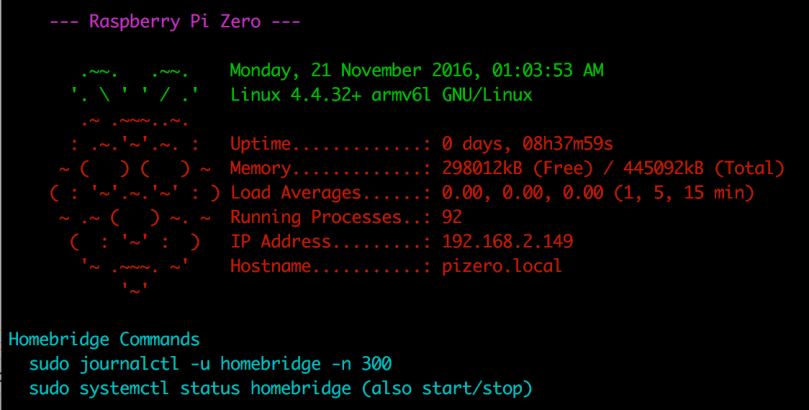
- Since I only access the Pi Zero via SSH, being welcomed by a bit of color with some info about the machine and reminders helps to increase the sugar content. I made a few modifications (my version is below) to a custom MOTD. The colors are set by
$(tput setaf 5)and changing the number (color table). You probably want to add this to.bashrcthough and not.bash_profileas instructed.
    let upSeconds="$(/usr/bin/cut -d. -f1 /proc/uptime)"
    let secs=$((${upSeconds}%60))
    let mins=$((${upSeconds}/60%60))
    let hours=$((${upSeconds}/3600%24))
    let days=$((${upSeconds}/86400))
    UPTIME=`printf "%d days, %02dh%02dm%02ds" "$days" "$hours" "$mins" "$secs"`

    # get the load averages
    read one five fifteen rest < /proc/loadavg

    echo "$(tput setaf 5)
    --- Raspberry Pi Zero ---
$(tput setaf 2)
       .~~.   .~~.    `date +"%A, %e %B %Y, %r"`
      '. \ ' ' / .'   `uname -srmo`$(tput setaf 1)
       .~ .~~~..~.
      : .~.'~'.~. :   Uptime.............: ${UPTIME}
     ~ (   ) (   ) ~  Memory.............: `cat /proc/meminfo | grep MemFree | awk {'print $2'}`kB (Free) / `cat /proc/meminfo | grep MemTotal | awk {'print $2'}`kB (Total)
    ( : '~'.~.'~' : ) Load Averages......: ${one}, ${five}, ${fifteen} (1, 5, 15 min)
     ~ .~ (   ) ~. ~  Running Processes..: `ps ax | wc -l | tr -d " "`
      (  : '~' :  )   IP Address.........: `/sbin/ifconfig wlan0 | /bin/grep "inet addr" | /usr/bin/cut -d ":" -f 2 | /usr/bin/cut -d " " -f 1`
       '~ .~~~. ~'    Hostname...........: `hostname --long`.local
           '~'
$(tput setaf 6)
Homebridge Commands
  sudo journalctl -u homebridge -n 300
  sudo systemctl status homebridge (also start/stop)
    $(tput sgr0)"
What are your favorite Raspberry Pi tips?
 Nick Momrik