Since I keep putting off a big home automation post due to not having much actual automation done, I’m going to split things up into a series of 3 posts. It’ll make for shorter posts and hopefully motivate me to get my automations done. This first post will share all of the equipment I have around my house, part 2 will be about the software, and part 3 will be about the actual automating.
 MyQ Garage Door Opener
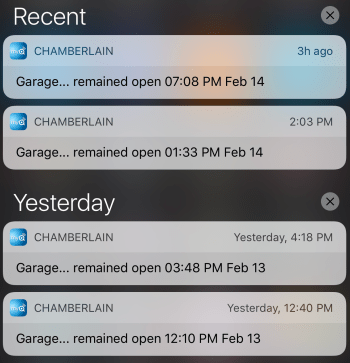
Don’t buy one of these. The online service the device communicates with is always having problems. I have mine configured to send me an alert whenever the door is open for at least 30 minutes. Over a 2 day period, all 4 of these notifications shown in the screenshot were incorrect! Happens at least once a month.
I want to see if I can reverse engineer the sensor attached to the door and make my own opener using a microcontroller and a spare remote I have.
Nest Thermostats
My house has a boiler with baseboard heat and 4 heating zones. I have one of these in each location. They work great.
Nest Protects
Alarms for detecting smoke and carbon monoxide. They “talk” to the thermostats as well. I have 3, but hope I never need to find out how well they work.
Nest Cam and the previous Dropcam
One is sitting on an end table pointed at my front door and one is mounted in my garage (mostly so I can check on the garage door if needed).
August Smark Lock with Connect
The lock on my front door. Runs through 4 AA batteries faster than I’d expect, but works great.
Harmony Hub with Ultimate One
I’ve used Harmony remotes for years. Love ’em!
Caséta Wireless
I have 8 switches and 5 remotes (there are a lot of 3-way switches in my house). These were simple to install. Having dimming capabilities is a nice feature.
Belkin Wemo
I have 2 Insight Smart Plugs, 2 Light Switches, and 1 Switch. The thing I like most about the Belkin devices is you don’t need a hub or anything else to control them. Very plug-n-play. I’m not sold on having plugs though. I’m using them for some lamps, but you have to remember not to turn the lamp off with the actual lamp switch otherwise your smart plug is useless.
Garage Temperature Sensor/Monitor
Built this device myself using a Raspberry Pi Zero v1.2 and some other electronics parts.
Wink Hub 2
Allows me to access devices from my control system.
Alexa Echo Dot
Maybe my favorite device. I use it every day to control the lights in the main areas of my house.
Automatic Pro
The location and status of my car feeds into my system so I can automate other things.
iPhone – Siri
I don’t use this much anymore with the Echo. Still comes in handy for quickly controlling something though. Will also use the iPhone location for automations of home/away status.
None of the stuff is cheap. We’re still in the early stages of home automation. Watch out in the next couple of years.
Some things I plan to add are:
- A moisture sensor near my sump pump so I can be alerted right away if something goes wrong. Maybe some sensors in bathrooms as well.
- This summer I plan to replace a couple of old in-wall AC units. One no longer works and the other is mostly broken. I’ll be buying units I can automate and control.
If you have questions about anything here, let me know.